2016年10月25日 星期二

setup_arch (2) - Kernel boot arguments_parse_early_param()

[Bootloader傳什麼進入kernel]
Bootloader 會傳入一串參數給kernel 以決定kernel 的運行
傳給核心的參數是以空格分隔的字串,通常的型式是
param[=value_1][,value_2]...[,value_10]
param是keyword, 一個param後面可以接最多10個value
由 bootloader 傳給核心的參數字串也可以包含傳給 init 程序的參數,kernel只會解析到 "--" 之前的字串,在 "--" 之後的字串會被當成傳給 init 程序的參數

[Bootloader用什麼data struct 傳入kernel]
使用struct tag, define 如下
146 struct tag {
147         struct tag_header hdr;
148         union {
149                 struct tag_core         core;
150                 struct tag_mem32        mem;
151                 struct tag_videotext    videotext;
152                 struct tag_ramdisk      ramdisk;
153                 struct tag_initrd       initrd;
154                 struct tag_serialnr     serialnr;
155                 struct tag_revision     revision;
156                 struct tag_videolfb     videolfb;
157                 struct tag_cmdline      cmdline;
158 
159                 /*
160                  * Acorn specific
161                  */
162                 struct tag_acorn        acorn;
163 
164                 /*
165                  * DC21285 specific
166                  */
167                 struct tag_memclk       memclk;
168         } u;
169 };
每一個tag都有一個tag_header定義如下
 24 struct tag_header {
 25         __u32 size;
 26         __u32 tag;
 27 };
[When will Bootloader pass into kernel]
227 void __init setup_arch(char **cmdline_p)
228 {
229         pr_info("Boot CPU: AArch64 Processor [%08x]\n", read_cpuid_id());
230 
231         sprintf(init_utsname()->machine, ELF_PLATFORM);
232         init_mm.start_code = (unsigned long) _text;
233         init_mm.end_code   = (unsigned long) _etext;
234         init_mm.end_data   = (unsigned long) _edata;
235         init_mm.brk        = (unsigned long) _end;
236 
237         *cmdline_p = boot_command_line;
238 
239         early_fixmap_init();
240         early_ioremap_init();
241 
242         setup_machine_fdt(__fdt_pointer);
243 
244         parse_early_param();
245 ...

從start_kernel --> setup_arch --> parse_early_param
進到parse_early_param就會開始解析preloader傳進來的參數

[early_param]
有較高優先權的參數稱為early_param
以maxcpus為例, 由preloader 傳給kernel, 因為(when __SMP__ is defined)boot up 時就需要知道maxcpus是多少, 因此在early_param時就會執行 maxcpus() in kernel/smp.c
More 可以參考
http://man7.org/linux/man-pages/man7/bootparam.7.html
524 static int __init maxcpus(char *str)
525 {
526         get_option(&str, &setup_max_cpus);
527         if (setup_max_cpus == 0)
528                 arch_disable_smp_support();
529 
530         return 0;
531 }
532 
533 early_param("maxcpus", maxcpus);
至於early_param 這個macro又是什麼呢? 繼續往下看
include/linux/init.h
238 /*
239  * Only for really core code.  See moduleparam.h for the normal way.
240  *
241  * Force the alignment so the compiler doesn't space elements of the
242  * obs_kernel_param "array" too far apart in .init.setup.
243  */
244 #define __setup_param(str, unique_id, fn, early)                        \
245         static const char __setup_str_##unique_id[] __initconst         \
246                 __aligned(1) = str;                                     \
247         static struct obs_kernel_param __setup_##unique_id              \
248                 __used __section(.init.setup)                           \
249                 __attribute__((aligned((sizeof(long)))))                \
250                 = { __setup_str_##unique_id, fn, early }
251 
252 #define __setup(str, fn)                                                \
253         __setup_param(str, fn, fn, 0)
254 
255 /*
256  * NOTE: fn is as per module_param, not __setup!
257  * Emits warning if fn returns non-zero.
258  */
259 #define early_param(str, fn)                                            \
260         __setup_param(str, fn, fn, 1)

early_param 跟 __setup 的實作都是 __setup_param, 只不過 early_param --> __setup_param會將其中的early參數設為1

進入__setup_param會發現這個macro其實是define兩個variable
(1) define 一個型態為 static const char 的variable, 並將str assign給它
     __setup_str_##unique_id[] = str

(2) define 一個型態為 static struct obs_kernel_param 的variable __setup_##unique_id
      並初始化data structure
      __setup_##unique_id = {__setup_str_##unique_id, fn, early}

struct obs_kernel_param 可以讓kernel記錄字串參數與相對應的處理函式
一樣定義在 include/linux/init.h
232 struct obs_kernel_param {
233         const char *str; //name of params
234         int (*setup_func)(char *); // function handler
235         int early; //true if it's early_param
236 };
我們再一次用上面maxcpus來展開
524 static int __init maxcpus(char *str)
525 {
526         get_option(&str, &setup_max_cpus);
527         if (setup_max_cpus == 0)
528                 arch_disable_smp_support();
529 
530         return 0;
531 }
532 
533 early_param("maxcpus", maxcpus);
macro 炸開之後........
static const char __setup_str_maxcpus[] __initconst __aligned(1) = "maxcpus"
static struct obs_kernel_param __setup_maxcpus __used __section(.init.setup) __attribute__((aligned(sizeof(long)))))
= { __setup_str_maxcpus, maxcpus, 1};

這樣就可以很清楚的發現
我們定義了一個裝有"maxcpus"的字串陣列, 再來有一個記錄 kernel params的 struct obs_kernel_param, 用來告訴kernel 這個param叫什麼, 以及遇到這個param的時候開call 什麼fundtion handler來處理

另外用藍色標起來的部分又是一個難題了
這裡將這個macro定義的資料放在 .init.setup 這個section中
關於.init.setup 這個section 是定義在 kernel-4.4\include\asm-generic\vmlinux_lds.h 中

#define INIT_SETUP(initsetup_align) \
. = ALIGN(initsetup_align); \
VMLINUX_SYMBOL(__setup_start) = .; \
*(.init.setup) \
VMLINUX_SYMBOL(__setup_end) = .;

代表所有被標註要放到.init.setup這個section的params都會被放在一起
而起始為至是 __setup_start & __setup_end

怎麼知道到底有哪些params會被放在 .init_setup中呢
可以打開 out\System.map看看
找到__setup_start了!! 下面緊接著都是 __setup_XXX
還看到了前面的舉例 __setup_maxcpus 這個param


[parse_early_param]
回到start_kernel--> setup_arch--> parse_early_param
這裡將boot_command_line copy 給 tmp_cmdline
接著呼叫 parse_early_options--> parse_args 開始解析kernel parameters
parse_args 會將cmd args切成一組組的<param,value>, 傳入callback function do_early_param
430 void __init parse_early_options(char *cmdline)
431 {
432         parse_args("early options", cmdline, NULL, 0, 0, 0, NULL,
433                    do_early_param);
434 }
435 
436 /* Arch code calls this early on, or if not, just before other parsing. */
437 void __init parse_early_param(void)
438 {
439         static int done __initdata;
440         static char tmp_cmdline[COMMAND_LINE_SIZE] __initdata;
441 
442         if (done)
443                 return;
444 
445         /* All fall through to do_early_param. */
446         strlcpy(tmp_cmdline, boot_command_line, COMMAND_LINE_SIZE);
447         parse_early_options(tmp_cmdline);
448         done = 1;
449 }

[do_early_param]
將傳入的params 跟 __setup_start , __setup_end區間中的args做比對, 若有符合的, 就call 該args的callback function (p->setup_func)做設定
411 /* Check for early params. */
412 static int __init do_early_param(char *param, char *val,
413                                  const char *unused, void *arg)
414 {
415         const struct obs_kernel_param *p;
416 
417         for (p = __setup_start; p < __setup_end; p++) {
418                 if ((p->early && parameq(param, p->str)) ||
419                     (strcmp(param, "console") == 0 &&
420                      strcmp(p->str, "earlycon") == 0)
421                 ) {
422                         if (p->setup_func(val) != 0)
423                                 pr_warn("Malformed early option '%s'\n", param);
424                 }
425         }
426         /* We accept everything at this stage. */
427         return 0;
428 }

reference:
[1] https://danielmaker.github.io/blog/linux/kernel_parameter_parsing.html
[2] http://blog.csdn.net/goto_chen/article/details/17392245
[3] http://blog.csdn.net/skyflying2012/article/details/41142801


Fix-Mapped Linear Address

Architecture: ARM64
[Intro]
Fixmap是固定一直指到physical addr的特定位址
Kernel會一次配一塊4K的virtual memory mapping 到physical addr

[Usage of Fix-Mapped Linear Address]
Kernel linear address的第四個GB中至少會有一塊128MB的memory mapping到physical address
這一塊memory 可以讓kernel implement 
(1) noncontiguous memory allocation (2) fix-mapped linear address

[Fix-Mapped Linear Address VS. Physical Address]
Fix-Mapped Linear Address 是一個constant address. 例如 0xffffc000
每一個Fix-Mapped Linear Address maps到一個page frame(4K) 的physical memory
Fix-Mapped Linear Address 跟 linear address that map the first 896MB of RAM 很像
但Fix-Mapped Linear Address可以mapping到任何physical address

[Data Structure enum fixed_addresses]
每一個fix-mapped linear address都有一個專用的integer index defined 在 enum fixed_addresses中
 36 enum fixed_addresses {
 37         FIX_HOLE,
 38 
 39         /*
 40          * Reserve a virtual window for the FDT that is 2 MB larger than the
 41          * maximum supported size, and put it at the top of the fixmap region.
 42          * The additional space ensures that any FDT that does not exceed
 43          * MAX_FDT_SIZE can be mapped regardless of whether it crosses any
 44          * 2 MB alignment boundaries.
 45          *
 46          * Keep this at the top so it remains 2 MB aligned.
 47          */
 48 #define FIX_FDT_SIZE            (MAX_FDT_SIZE + SZ_2M)
 49         FIX_FDT_END,
 50         FIX_FDT = FIX_FDT_END + FIX_FDT_SIZE / PAGE_SIZE - 1,
 51 
 52         FIX_EARLYCON_MEM_BASE,
 53         FIX_TEXT_POKE0,
 54         __end_of_permanent_fixed_addresses,
 55 
 56         /*
 57          * Temporary boot-time mappings, used by early_ioremap(),
 58          * before ioremap() is functional.
 59          */
 60 #define NR_FIX_BTMAPS           (SZ_256K / PAGE_SIZE)
 61 #define FIX_BTMAPS_SLOTS        7
 62 #define TOTAL_FIX_BTMAPS        (NR_FIX_BTMAPS * FIX_BTMAPS_SLOTS)
 63 
 64         FIX_BTMAP_END = __end_of_permanent_fixed_addresses,
 65         FIX_BTMAP_BEGIN = FIX_BTMAP_END + TOTAL_FIX_BTMAPS - 1,
 66 
 67         /*
 68          * Used for kernel page table creation, so unmapped memory may be used
 69          * for tables.
 70          */
 71         FIX_PTE,
 72         FIX_PMD,
 73         FIX_PUD,
 74         FIX_PGD,
 75 
 76         __end_of_fixed_addresses
 77 };

[How to Obtain the Linear Address Set of a Fix-Mapped Linear Address]
23 #ifndef __ASSEMBLY__
 24 /*
 25  * 'index to address' translation. If anyone tries to use the idx
 26  * directly without translation, we catch the bug with a NULL-deference
 27  * kernel oops. Illegal ranges of incoming indices are caught too.
 28  */
 29 static __always_inline unsigned long fix_to_virt(const unsigned int idx)
 30 {
 31         BUILD_BUG_ON(idx >= __end_of_fixed_addresses);
 32         return __fix_to_virt(idx);
 33 }

fix_to_virt -> __fix_to_virt: 能夠根據index找到 constant linear address
如下, PAGE_SHIFT = 12
所以每一個index 對應到的linear address是從FIXADDR_TOP開始減 4K 的倍數
20 #define __fix_to_virt(x)        (FIXADDR_TOP - ((x) << PAGE_SHIFT))


目前畫出的memory layout不一定正確, 若有誤會再修正

[Reference]
Fixmap:
http://palliatory66.rssing.com/chan-60693167/latest.php

ARM64 memory
http://blog.csdn.net/qianlong4526888/article/details/9058221

Linux doc about arm64 memory
http://lxr.free-electrons.com/source/Documentation/arm64/memory.txt?v=4.4

Linux kernel memory management
https://0xax.gitbooks.io/linux-insides/content/mm/linux-mm-2.html

Windows7 memory layout
http://www.codemachine.com/article_x64kvas.html


2016年10月24日 星期一

setup_arch(1) - setup_machine_fdt()

We will focus on device tree initialization in this article
First, take a look of setup_arch() -> setup_machine_fdt()
179 static void __init setup_machine_fdt(phys_addr_t dt_phys)
180 {
181         void *dt_virt = fixmap_remap_fdt(dt_phys);
182 
183         if (!dt_virt || !early_init_dt_scan(dt_virt)) {
184                 pr_crit("\n"
185                         "Error: invalid device tree blob at physical address %pa (virtual address 0x%p)\n"
186                         "The dtb must be 8-byte aligned and must not exceed 2 MB in size\n"
187                         "\nPlease check your bootloader.",
188                         &dt_phys, dt_virt);
189 
190                 while (true)
191                         cpu_relax();
192         }
193 
194         dump_stack_set_arch_desc("%s (DT)", of_flat_dt_get_machine_name());
195 }

1. fixmap_remap_fdt(): 找到device tree的virtual addr
2. early_init_dt_scan(dt_virt): 為之後的DTB scan 做準備, 並進行參數傳遞
3. dump_stack_set_arch_desc(): 印出hardware name, 並把stack dump出來
由 2 進一步從early_init_dt_scan -> early_init_dt_scan_nodes() 看
1212 void __init early_init_dt_scan_nodes(void)
1213 {
1214         /* Retrieve various information from the /chosen node */
1215         of_scan_flat_dt(early_init_dt_scan_chosen, boot_command_line);
1216 
1217         /* Initialize {size,address}-cells info */
1218         of_scan_flat_dt(early_init_dt_scan_root, NULL);
1219 
1220         /* Setup memory, calling early_init_dt_add_memory_arch */
1221         of_scan_flat_dt(early_init_dt_scan_memory, NULL);
1222 }

第一個of_scan_flat_dt: scan /chosen node, save bootargs to boot_command_line, 還處理initrd相關的property, 存到initrd_start, initrd_end這兩個global variables中

第二個of_scan_flat_dt: scan root node, 取得 {size, addr}-cells 的資訊, 並存到dt_root_size_cells 和 dt_root_addr_cells global variables中

第三個of_scan_flat_dt: scan DTB中的memory node, 並把相關的資訊存入meminfo, meminfo是global variable, 保存系統的memory相關的資訊


2014年8月6日 星期三

SSDT Hook

A. SSDT

SSDT 全名為System Service Dispatch Table,從圖來解釋比較快。Windows中Service Descriptor Table有兩種,分別是KeServiceDescriptorTable以及 KeServiceDescriptorTableShadow。每一個Table都是用一個SST Strucute來定義。
而SST中的欄位:
ServiceTableBase: points to the SSDT
ServiceCounterTableBase: Not used
ServiceLimit: number of entries in the SSDT
ArgumentTable: points to the SSDP table (system service Parameter table). 每一個byte儲存每一個SSDT routine其parameter所需用到的bytes數


因此循著ServiceTableBase的address可以找到SSDT的位置。在利用index找到target routine就可以進行hook了!

我們可以用windbg來實際看一下SSDT長什麼樣子
依照前幾篇文章設定好的VS2013+VM target machine的 remote debug
我就透過VS2013直接對我在VM中的windows7進行debug

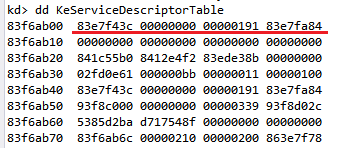
(1) dd KeServiceDescriptorTable

可以看到KeServiceDescriptorTable的內容被印出來啦!根據前面介紹的概念,紅線標出的部分就是Structure的內容,因此83e7f43c就是SSDT 的address。至於其他內容代表的是什麼還有待查證。
用 dps nt!KeServiceDescriptorTable l4 也可以看到內容。

(指令 dd 的第一個d是代表印出指向指定位置的內容,第二個d代表用DWORD的形式,因此也有db(byte),du(unicode),dc(char)等指令)
(指令 dps代表 display words and symbol,l4是line4,印出4行)

(2) dps nt!KiServiceTable L poi nt!KiServiceLimit
此時會依據KiServiceLimit內容印出KiServiceTable,由於KiServiceLimit是此SSDT的number of entris,因此這行指令代表的就是印出KiServieTable的全部內容啦! 
(這裡的KiServiceTable應該就是structue的name,就是SSDT本人啦)
可以看到每一個SSDT routine以及他們的memory address。
(圖中可以看到第一排的第一個addr 83e7f43c,這不就是我們前一步看到的KeServiceDescriptorTable的內容嗎?沒錯,事實證明83e7f43c就是SSDT的起始address啦~太棒啦)

B. SSDT Hooking

Hook說穿了就是把SSDT中的某一個entry內容改掉,變成指向我們的hook function,為了避免system crash最後在hook function中再call 原先的SSDT routine。 

用A(2)的圖來解釋的話,如果我們想要hook NtAcceptConnectPort,就只要把SSDT[0]的內容改成我們自己的hook function address就可以啦(原本是8407afcf),如此一來每當系統要call這個native api並到SSDT中來找時就會循著address找到我們的hook function。hook function就會依照programmer的設計來做事了。

C. Hooking ntQuerySystemInformation

這一次我想hook的native api是 ntQuerySystemInformation,要找到ntQuerySystemInformation要從 ZWQuerySystemInformation開始,ZWQuerySystemInformation是ntoskrnl.exe中的一個win32 API,只要將ZWQuerySystemInformation的code做disassemble就能夠發現ZWQuerySystemInformation其實是將index value存入eax register,在call KiServiceTable,也就是到SSDT中根據Index value找到ntQuerySystemInformation的address。最後就執行ntQuerySystemInformation。

用windbg command可以用 u nt!ZwQuerySystemInformation看到反組譯後的code,由mov到eax的value可以知道ntQuerySystemInformation的index value是261(10進制)。我們就可以用
SSDT 起始address+4*index來算出ntQuerySystemInformation 存在SSDT中的哪一個位址。

D. Code Explaination

(1) Function Prototypes

MyDriver_UnSupportedFunction: assign給driver object的function,告訴driver object要做哪些事。目前沒有太大的用途囉。
MyDriver_Unload: 當Driver要unload時會call此function
DriverEntry:為此程式的entry point

/* Function Prototypes */
NTSTATUS MyDriver_UnSupportedFunction(PDEVICE_OBJECT DeviceObject, PIRP Irp);
VOID MyDriver_Unload(PDRIVER_OBJECT DriverObject);
NTSTATUS DriverEntry(PDRIVER_OBJECT pDriverObject, PUNICODE_STRING pRegistryPath);


(2) Compile directives

#pragma alloc_text(INIT, DriverEntry)
#pragma alloc_text(PAGE, MyDriver_Unload)
#pragma alloc_text(PAGE, MyDriver_UnSupportedFunction)

#pragma是一個預處理指令,告訴compiler要做些特別的事(如果compiler看得懂的話才會做)
而 #pragma alloc_text 只能處理C function,用來指定section locations.Microsoft 文件有提到"The alloc_text pragma must appear after the declarations of any of the specified functions and before the definitions of these functions"因此要注意#pragma的位置。
這裡指定DriverEntry載入到INIT記憶體區段中,最後Unload之後,可以退出memory。另外兩個function則是指定載入PAGE sections。

(3) System Service Table Structure

/*The structure representing the System Service Table*/
    typedef struct SystemServiceTable{
    UINT32* ServiceTable;
    UINT32* CounterTable;
    UINT32* ServiceLimit;
    UINT32* ArgumentTable;
} SST;

/* Declaration of KeServiceDescriptorTable, which is exported by ntoskrnl.exe */
// KeserviceDescriptorTable symbol is just a memory addr exported by kernel
__declspec(dllimport) SST KeServiceDescriptorTable;


KeServiceDescriptorTable可以由ntoskrnl.exe得到,因此為了得到kernel輸出的symbol,必須透過__declspec(dllimport)的方法。dllimport可以用來告訴compiler,kernel要export一個特定的function,叫compiler不要throw error出來。(一般來說compiler會反應error因為compiler不認識這個function)最後如果我們要用到此symbol時,linker會負責找到這個symbol的address。

因為kernel給我們的symbol 只有一個address,而address裡的內容我們必須要定義一個structure來取出我們要的info。因此我們定義了一個SystemServiceTable的結構以取出該address中的資料。

(4)ZwQuerySystemInformation Definition

/* Required information for hooking ZwQuerySystemInformation */
NTSYSAPI NTSTATUS NTAPI ZwQuerySystemInformation(
    ULONG SystemInformationClass,
    PVOID SystemInformation,
    ULONG SystemInformationLength,
    PULONG ReturnLength
);

typedef NTSTATUS(*ZwQuerySystemInformationPrototype)(
    ULONG SystemInformationClass,
    PVOID SystemInformation,
    ULONG SystemInformationLength,
    PULONG ReturnLength
);

/* global variable is used as a placeholder for saving the old address from SSDT */
ZwQuerySystemInformationPrototype oldZwQuerySystemInformation = NULL;


ZwQuerySystemInformation是我們想要hook的function,負責回傳特定的system information。(此function 在win8上好像已經不能使用?)和上面一樣,我們沒有kernel code,因此只好依著查到的prototype來定義一個自己用的ZwQuerySystemInformation。Structure的parameter說明如下:
(a)SYSTEM_INFORMATION_CLASS:定義了我們想要retrieve的system information的type,可以是SystemBasicInformation、SystemProcessInformation、SystemProcessPerformanceInformation...等,詳細的資訊可以去msdn查。
(b)SystemInformation: 是一個指向buffer的pointer。buffer中存的是retrieve回來的資料。至於buffer的大小和struct視SystemInformationClass 而定。
(c)SystemInformationLength: buffer的size(bytes)
(d)ReturnLength: optional 參數,就是實際被寫入buffer中的bytes

另外我們需要定義一個function pointer oldZwQuerySystemInformation,這個function pointer會儲存舊的native api的address,我們在hook function中會需要此function pointer來指到真正的ZwQuerySystemInformation,讓系統繼續完成他的工作。

這裡的oldZwQuerySystemInformation是一個global variable,當作一個容器儲存被我們hook的native function。

(5) Set Write Access to WP flag

/* Disable the WriteProtect bit in CR0 register */
void DisableWP(){
    __asm{
        push edx;
        mov edx, cr0;
        and edx, 0xFFFEFFFF;
        mov cr0, edx;
        pop edx;
    }
}
/* Enable the WriteProtect bit in CR0 register */
void EnableWP(){
    __asm{
        push edx;
        mov edx, cr0;
        or edx, 0x00010000;
        mov cr0, edx;
        pop edx;
    }

我們對SSDT是沒有write access的,那要如何取得權限呢? reference[1]中有提到3個方法,那我一樣是採取最方便的做法,將CR0的WP flag 設成0,一旦設成0就能夠寫入SSDT新的資料,最後結束hooking時再將CR0的WP flag設回1

(6) HookSSDT  (mainly hooking function!)

PULONG HookSSDT(PUCHAR syscall, PUCHAR hookaddr){

    /* local variables */
    UINT32 index;
    PLONG ssdt;
    PLONG target;
    PULONG ret;

    /* disable WP bit in CR0 to enable writing to SSDT */
    DisableWP();
    //DbgPrint(" The WP flag in CR0 has been disabled.\n");
    DbgPrint(" In HookSSDT().\n");
    /* identify the address of SSDT table */
    ssdt = KeServiceDescriptorTable.ServiceTable;
    DbgPrint(" The system call address is %x\n", syscall);
    DbgPrint(" The hook function address is %x\n", hookaddr);
    DbgPrint(" The address of the SSDT is %x\n", ssdt);
    /* identify 'syscall' index into the SSDT table */
    /* *()means to dereference, to get the content at that addr */
    index = *((PULONG)(syscall + 0x1));
    DbgPrint(" The index into the SSDT table is %d\n", index);
    /* get the address of the service routine in SSDT */
    target = (PLONG)&(ssdt[index]);
    DbgPrint(" The address of the SSDT routine to be hooked is %x\n", target);
    DbgPrint(" The content of ssdt[261] is %x\n", ssdt[index]);
    //ret = (PUCHAR)InterlockedExchange(target, hookaddr);
    ret = (PVOID)InterlockedExchange(&ssdt[index], hookaddr);
    DbgPrint(" exchange!new ssdt[261] is %x\n", ssdt[index]);
    /* hook the service routine in SSDT */
    return ret;
}


HookSSDT的參數是syscall 以及 hookaddr,syscall是要hook的api address,但此api不是native code。前面有提到,這種API一開始就會將index 放入eax中在call KiServiceTable到SSDT中呼叫真正的native api。(ntokrnl.exe中: Zw系列-->call Nt系列)。

簡單來說這裡的sample中我給的參數是ZwQuerySystemInformation的addr,沿著此address找到index value之後我再去SSDT[index]得到我想要的NtQuerySystemInformation,就可以hook NtQuerySystemInformation啦!

HookSSDT做的事情有:
(1)Disable WPflag
(2)利用KeServiceDescriptorTable.ServiceTable取出ssdt的起始address
(3)利用syscall addr+1取出syscall的index(用*取出該address的內容)
(4)取得SSDT[index]的address (用&取得)
(5)用InterlockedExchange()交換兩address的內容
(6)return InterlockedExchange的return value,也就是回傳ntQuerySystemInformation的address

(7) Hook_ZwQuerySystemInformation

/* hook function */
NTSTATUS Hook_ZwQuerySystemInformation(ULONG SystemInformationClass,
PVOID SystemInformation, ULONG SystemInformationLength, PULONG ReturnLength){

    /* local variables */
    NTSTATUS status;
    PBYTE buffer;
    /* calling new instructions */
    DbgPrint(" ZwQuerySystemInformation hook called\n");

    /* calling old function */
   status=oldZwQuerySystemInformation(SystemInformationClass,SystemInformation, SystemInformationLength, ReturnLength);
    // if(!NT_SUCCESS(status))
    if (status == STATUS_INFO_LENGTH_MISMATCH) {
        DbgPrint("Error:length mismatch! Allocate new buffer! ");
        //PBYTE buffer = malloc((PULONG)ReturnLength * sizeof(PBYTE));
        PBYTE buffer = ExAllocatePoolWithTag(PagedPool, ReturnLength, 'Tag1');
        if (buffer == NULL){
        DbgPrint(" Allocate Error\n");
        status = STATUS_INSUFFICIENT_RESOURCES;
        return status;
        }
    status = oldZwQuerySystemInformation(SystemInformationClass, (PVOID)buffer, ReturnLength, NULL);
        if (status == STATUS_SUCCESS){
            DbgPrint("--call origin api again and success! \n");
        }
    }else if (NT_SUCCESS(status)){
    DbgPrint("call origin api success! \n");
    }
    return status;
}

HookSystemInformation會call old native api ,也就是ntQuerySystemInformation,來繼續retrieve system information。

(8) DriverUnload


Driver 的unload有分2部分,分別是DriverUnload Routine以及 Driver image實際上的unload,我參考了reference3畫了一個簡易圖示如下


程式碼部分這裡沒有做太多事,只有將SSDT有修改的地方restore回去,也就是將原本ntQuerySystemInformation的address放回SSDT[261]裡去。最後call IODeleteSymbolicLink以及 IODeleteDevice準備unload driver image。

VOID DriverUnload(PDRIVER_OBJECT DriverObject)
{
    UNICODE_STRING usDosDeviceName;
    /* restore the hook */
    /* let syscall addr in SSDT point to original syscall addr*/
    if (oldZwQuerySystemInformation != NULL){
   oldZwQuerySystemInformation=(ZwQuerySystemInformationPrototype)HookSSDT((PULONG)ZwQuerySystemInformation, (PULONG)oldZwQuerySystemInformation);
        EnableWP();
        DbgPrint(" The original SSDT function restored\n");
    }

    DbgPrint("Driver unload\n");
    RtlInitUnicodeString(&usDosDeviceName, L"\\DosDevices\\MySSDTHooking");
    IoDeleteSymbolicLink(&usDosDeviceName);
    IoDeleteDevice(DriverObject->DeviceObject);
}

(9) DriverEntry (Driver程式進入點)

DriverEntry中做的事情有
(1)IOCreateDevice:create device object
(2)若create 成功,assign major function給driver object。這裡全都assign同一個function,也就是 MyDriver_UnSupportedFunction,這個function什麼也不做,只是一個簡單的雛形。
(3)assign DriverUnload function,這個動作有點像是callback function,就是告訴system當driver 要 unload時該call哪一個function。
(4)IoCreateSymbolicLink:create symbolic link
(5)call HookSSDT,最重要的step。第一個param是ZwQuerySystemInformation,因為他是我們的目標嘛,第二個param是Hook_ZwQuerySystemInformation,就是我們要replace ZwQuerySystemInformation的function。Call HookSSDT之後,SSDT的第261個entry內容就會指向Hook_ZwQuerySystemInformation,並且return 原來ZwQuerySystemInformation的address。我將他存在oldZwQuerySystemInformation(一個global variable),之後在driver unload以及Hook_ZwQuerySystemInformation裡都會用到此變數,因為我需要call 這個真正的native api以維持system 正常運作。

NTSTATUS DriverEntry(PDRIVER_OBJECT pDriverObject, PUNICODE_STRING pRegistryPath){

    NTSTATUS NtStatus = STATUS_SUCCESS;
    unsigned int uiIndex = 0;
    PDEVICE_OBJECT pDeviceObject = NULL;
    UNICODE_STRING usDriverName, usDosDeviceName;

    DbgPrint("DriverEntry called\n");

    // initialize driver name and device name
    RtlInitUnicodeString(&usDriverName, L"\\Device\\MySSDTHooking");
    RtlInitUnicodeString(&usDosDeviceName, L"\\DosDevices\\MySSDTHooking");
    // create a new device object(type is FILE_DEVICE_UNKNOWN, can only be used by a application)
    NtStatus = IoCreateDevice(pDriverObject, 0, &usDriverName, FILE_DEVICE_UNKNOWN, FILE_DEVICE_SECURE_OPEN, FALSE, &pDeviceObject);

    if (NtStatus == STATUS_SUCCESS){
        /* MajorFunction: is a list of function pointers for entry points into the driver */
        for (uiIndex = 0; uiIndex < IRP_MJ_MAXIMUM_FUNCTION; uiIndex++)
           pDriverObject->MajorFunction[uiIndex] = MyDriver_UnSupportedFunction;

        pDriverObject->DriverUnload = DriverUnload;
        pDeviceObject->Flags |= DO_BUFFERED_IO;
        pDeviceObject->Flags &= (~DO_DEVICE_INITIALIZING);

        // Create symbol link
        IoCreateSymbolicLink(&usDosDeviceName, &usDriverName);
        DbgPrint("ZwQuerySystemInformation is at %x\n", ZwQuerySystemInformation);
        oldZwQuerySystemInformation =     (ZwQuerySystemInformationPrototype)HookSSDT((PULONG)ZwQuerySystemInformation, (PULONG)Hook_ZwQuerySystemInformation);
        DbgPrint("HookSSDT return addr is %x\n", oldZwQuerySystemInformation);
    }
    DbgPrint("DriverEntry finished\n");
    return STATUS_SUCCESS;
}

(10) MyDriver_UnSupportedFunction

前面提過啦~這在這裡是一個不重要的function,以後有用到再紀錄

NTSTATUS MyDriver_UnSupportedFunction(PDEVICE_OBJECT DeviceObject, PIRP Irp){
    NTSTATUS NtStatus = STATUS_NOT_SUPPORTED;
    //DbgPrint("MyDriver_UnSupportedFunction called\n");
    return NtStatus;
}

(11) Summary


總結一下這一次的project是hook ZwQuerySystemInformation,但實際上是更改SSDT[261]指向的位置,原本指向NtQuerySystemInformation,我改成指向自己的hook_function,ZwQuerySystemInformation負責將index存入eax再call system service,所以真正回報系統info的是NtQuerySystemInformation。

(12) Reference

以上的程式大部分不是我自己會寫的,而是讀了許多文章學習而來,仍有許多問題還未解決,以後再陸續紀錄新問題與解決之法。
[1] 完整hooking教學
http://resources.infosecinstitute.com/hooking-system-service-dispatch-table-ssdt/
[2]中文教學 
http://www.cnblogs.com/BoyXiao/archive/2011/09/03/2164574.html
[3] Unload driver concept
http://blogs.msdn.com/b/usbcoreblog/archive/2009/10/06/why-doesn-t-my-driver-unload.aspx
[4] alloc text msdn
http://msdn.microsoft.com/en-us/library/sw8ty6zf.aspx
[5]Building and deploying a basic WDF Kernel Mode Driver
http://www.codeproject.com/Articles/13090/Building-and-deploying-a-basic-WDF-Kernel-Mode-Dri
[6]DbgMessage filter
http://msdn.microsoft.com/en-us/library/windows/hardware/ff551519(v=vs.85).aspx

終於寫完了然後code怎麼這麼醜阿~天啊 Q_Q
by BlackCat 


全國推廣動物認領養平台串聯貼紙

全國推廣動物認領養平台串聯貼紙